A PLC Sequencer is one of the most useful programming techniques for automating repetitive machine operations. Instead of writing separate ladder logic for every stage of a process, a PLC sequencer executes predefined steps in a fixed order. This approach simplifies programming, reduces memory usage, and makes troubleshooting easier.
PLC sequencers are widely used in manufacturing plants, conveyor systems, packaging machines, traffic light control, bottling plants, and many other industrial automation applications. Whether the process involves turning motors on and off, operating valves in sequence, or controlling multiple actuators, a PLC sequencer ensures that every action occurs in the correct order.
In this article, you’ll learn what a PLC Sequencer is, how it works, the PLC Sequencer logic, different types of sequences, and why sequencer programming is preferred in many industrial applications.
What is a PLC Sequencer?
A PLC Sequencer is a programming method that allows a programmable logic controller (PLC) to execute a series of predefined operations one after another. Each operation is called a step, and every step contains specific instructions that determine which outputs should turn ON or OFF.
Unlike conventional ladder logic, where each output requires individual programming, a PLC sequencer stores the desired output patterns in memory and executes them sequentially. As a result, complex machine operations become much easier to design and maintain.
Think of a PLC sequencer as a digital instruction list. The PLC follows this list step by step until the sequence is complete. Depending on the application, the sequence may stop at the final step or automatically restart from the beginning.
For example, consider a simple conveyor system:
- Start the conveyor motor.
- Detect the product using a sensor.
- Stop the conveyor.
- Extend a pneumatic cylinder.
- Retract the cylinder.
- Restart the conveyor.
Instead of writing separate interlocking logic for each stage, a PLC sequencer stores these operations as individual sequence steps and executes them one after another.
Why is a PLC Sequencer Required?
Many industrial machines perform the same sequence repeatedly throughout the day. Programming each output separately can make the ladder diagram lengthy, difficult to understand, and harder to modify.
A PLC Sequencer solves these problems by organizing machine operations into a structured sequence.
Some common reasons for using a PLC sequencer include:
- Simplifies ladder logic.
- Reduces programming time.
- Saves PLC memory.
- Makes troubleshooting easier.
- Allows quick modification of sequence steps.
- Improves machine reliability.
- Reduces programming errors.
Imagine a bottle filling machine with twenty operating steps. Without a sequencer, the program may contain hundreds of rungs. Using a PLC sequencer, the same process can often be controlled using a compact sequence table and a few ladder logic instructions.
How Does a PLC Sequencer Work?
The working principle of a PLC Sequencer is based on executing one predefined step after another. Each step contains an output pattern that tells the PLC which outputs should be energized and which should remain OFF.
The basic operation follows these stages:
Step 1: Store the Sequence
The desired output combinations are stored in a data table or memory array. Every row represents one operating step.
For example:
| Step | Conveyor | Valve | Motor |
|---|---|---|---|
| 1 | ON | OFF | OFF |
| 2 | ON | ON | OFF |
| 3 | OFF | ON | OFF |
| 4 | OFF | OFF | ON |
Each row becomes one step in the PLC sequencer.
Step 2: Execute the First Step
When the operator presses the Start push button, the PLC begins executing the first step.
Only the outputs assigned to Step 1 become active.
Step 3: Wait for a Trigger
The sequencer does not automatically move to the next step.
It waits for a trigger, such as:
- Timer completion
- Sensor activation
- Push button press
- Counter value
- Limit switch
- Encoder pulse
- External signal
Once the trigger condition becomes true, the PLC advances to the next sequence step.
Step 4: Update Outputs
The PLC reads the next sequence data and updates the output devices.
Some outputs turn OFF while others turn ON according to the programmed sequence.
Step 5: Continue Until Completion
The process continues until all programmed steps have been executed.
Depending on the application, the PLC may:
- Return to the first step
- Stop automatically
- Wait for another Start command
- Repeat continuously
This structured operation makes a PLC sequencer ideal for repetitive industrial processes.
PLC Sequencer Logic
The PLC Sequencer logic is based on the concept of moving from one operating step to the next whenever a predefined condition is satisfied.
Instead of controlling outputs individually, the PLC keeps track of the current sequence position. Each position represents a unique machine state.
The basic PLC sequencer logic follows this pattern:
▼
▼
▼
▼
▼
▼
▼
▼
The trigger that advances the sequence can be generated by:
- Timer
- Photoelectric sensor
- Proximity switch
- Push button
- Counter
- Encoder
- Machine feedback
This approach ensures that every machine operation occurs in the correct order without requiring complicated ladder logic.
Main Components of a PLC Sequencer
Although different PLC manufacturers use different instruction names, every PLC sequencer generally contains the following components.
Sequence Table
The sequence table stores the output pattern for every operating step. Each row represents one stage of machine operation.
Current Position
The position indicates the active sequence step. After every trigger event, the PLC increments the position value.
Trigger Condition
A trigger tells the PLC when it should move to the next step. The trigger can be generated by:
- Timer
- Sensor
- Push button
- Counter
- External signal
Output Word
The output word contains the actual ON/OFF status that will be sent to field devices. As the sequence advances, the output word changes according to the stored sequence data.
Types of Sequences in PLC
Industrial processes do not always follow the same operating pattern. Depending on the application, different types of sequences can be implemented using a PLC Sequencer.
The most common types are explained below.
1. Linear Sequence
A linear sequence executes every step in a fixed order.
Example:
Step 1 → Step 2 → Step 3 → Step 4
This is the simplest and most widely used sequence in industrial automation.
Typical applications include:
- Conveyor systems
- Traffic lights
- Bottle filling machines
- Packaging machines
2. Cyclic Sequence
A cyclic sequence automatically returns to the first step after completing the last step.
Example:
Step 1 → Step 2 → Step 3 → Step 1
This type of sequence is ideal for continuous production systems.
Applications include:
- Rotary indexing tables
- Mixing systems
- Continuous manufacturing processes
- Automatic washing systems
3. Time-Based Sequence
In this sequence, timers determine when the PLC advances to the next step.
For example:
- Motor ON for 10 seconds
- Valve opens for 5 seconds
- Pump runs for 15 seconds
Time-based sequences are common in heating, drying, curing, and chemical processing systems.
4. Event-Based Sequence
The PLC moves to the next step only after receiving a signal from a field device.
Examples include:
- Proximity sensor detection
- Cylinder limit switch
- Product detection sensor
- Pressure switch
This method improves operational safety because the next operation begins only after the previous one has been successfully completed.
5. Manual Sequence
In manual sequencing, the operator decides when the PLC should move to the next step.
This method is mainly used during:
- Machine testing
- Maintenance
- Commissioning
- Operator training
6. Conditional Sequence
A conditional sequence advances only when specific logical conditions are satisfied.
For example:
- Tank level reaches the set point.
- Temperature exceeds 80°C.
- Pressure becomes stable.
- Both safety switches are ON.
Conditional sequences are commonly used in process automation where operating conditions vary.
Key Features of a PLC Sequencer
A PLC sequencer offers several features that make industrial automation more efficient.
Some important features include:
- Executes operations step by step.
- Reduces ladder logic complexity.
- Supports repetitive machine operations.
- Simplifies troubleshooting.
- Requires less program memory.
- Easy to expand and modify.
- Provides consistent machine operation.
- Compatible with timer, counter, and sensor-based control.
- Supports automatic and manual sequencing.
PLC Sequencer Instruction
A PLC Sequencer instruction is a dedicated programming instruction that enables a PLC to execute a series of predefined operations in a specific order. Instead of writing separate ladder logic for each output, the sequencer reads output patterns from a sequence table and updates the outputs one step at a time. This approach simplifies program development, reduces memory usage, and makes future modifications easier.
Different PLC manufacturers implement sequencer instructions in different ways. For example, Allen-Bradley PLCs provide three dedicated sequencer instructions:
- SQO (Sequencer Output) – Transfers output patterns from a sequence table to the output word.
- SQI (Sequencer Input) – Compares actual input data with a predefined input pattern.
- SQL (Sequencer Load) – Stores data into the sequence table for later use.
Among these instructions, SQO (Sequencer Output) is the most widely used because it directly controls the sequence of machine outputs.
PLC Sequencer Output (SQO)
The Sequencer Output (SQO) instruction controls outputs by transferring predefined data from a reference sequence table to the PLC output word. Each time the instruction receives a valid trigger, it advances to the next sequence position and updates the outputs according to the stored data.
This method allows the PLC to execute repetitive machine operations without requiring lengthy ladder logic. As a result, programming becomes more organized, and modifying the operating sequence is much easier.
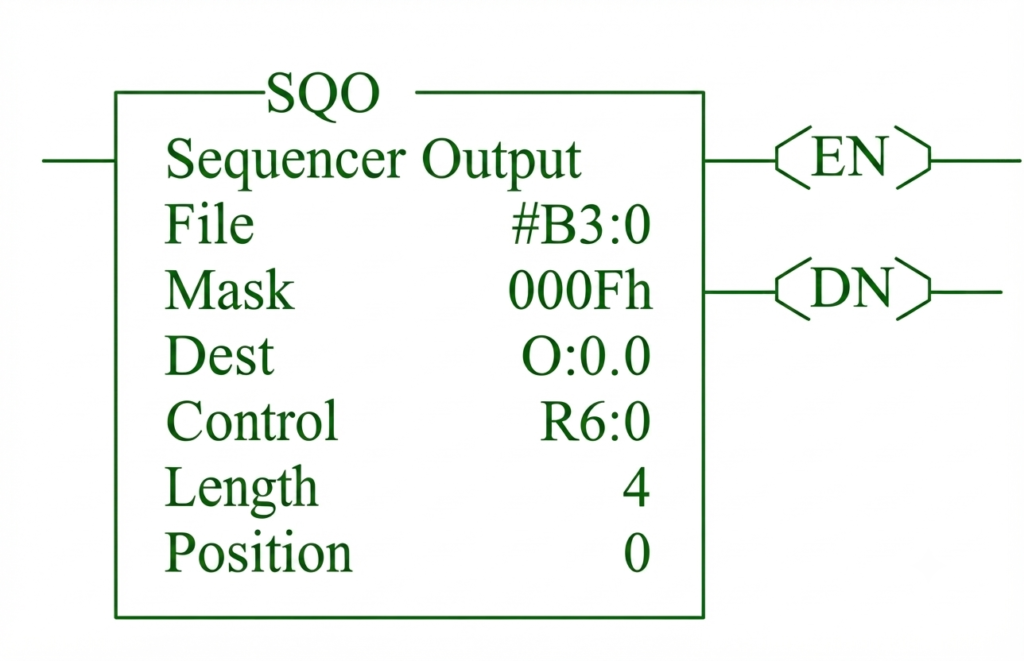
Parameters of the SQO Instruction
The SQO instruction contains several parameters that determine how the sequencer operates.
File: This parameter specifies the reference sequence table where the output patterns are stored. Each row in the table represents one sequence step, and the PLC reads these rows sequentially during operation.
Mask: Using the mask, the programmer determines which output bits the sequencer can modify. A mask bit set to 1 allows the corresponding output to change, while a bit set to 0 keeps the existing output unchanged.
Destination (Dest): The destination parameter specifies the PLC output word where the sequence data is written. After the data is transferred, field devices such as motors, solenoid valves, lamps, or contactors operate according to the programmed sequence.
Control: Within this parameter, the PLC stores important information such as the current status, active sequence position, and completion status. This information allows the controller to track the progress of the sequence.
Length: This parameter defines the total number of steps in the sequence table. Only the programmed steps are executed before the sequencer either restarts or stops, depending on the application.
Position: The position parameter identifies the current step being executed. Every valid trigger increments this value, allowing the PLC to move through the sequence one step at a time.
PLC Sequencer Input (SQI)
The Sequencer Input (SQI) instruction compares the current PLC input status with a predefined input pattern stored in the sequence table. Instead of controlling outputs, SQI verifies whether the required input conditions have been met before allowing the sequence to continue. This instruction is commonly used to confirm sensor signals, limit switch positions, and other process conditions.
Sequencer Load (SQL)
The Sequencer Load (SQL) instruction stores data into the sequence table. It is primarily used during system setup or commissioning to create or update sequence data. Once the required output patterns have been stored, the SQO instruction can use this information to control the machine automatically.
PLC Sequencer Examples
Understanding the theory behind a PLC Sequencer is important, but learning through practical examples makes the concept much easier to grasp. A sequencer is commonly used whenever a machine must perform a series of operations in a fixed order.
The following PLC Sequencer examples demonstrate how sequential control works in real industrial applications.
PLC Sequencer Example 1: Traffic Light Control System
A traffic light is one of the simplest examples of sequential control. The lights change in a fixed order, making it an ideal application for a PLC sequencer.
Sequence of Operation
| Step | Red | Yellow | Green |
|---|---|---|---|
| 1 | OFF | OFF | ON |
| 2 | OFF | ON | OFF |
| 3 | ON | OFF | OFF |
| 4 | Repeat | Repeat | Repeat |
The PLC stores these output patterns in a sequence table.
A timer generates the advance signal every few seconds. Whenever the timer finishes, the sequencer moves to the next step.
The cycle continues indefinitely.
Step-by-Step Operation
The PLC sequencer controls the traffic lights by switching each signal in a predefined order. Each light remains active for a preset time before the PLC advances to the next step.
Step 1: The PLC energizes the green light, allowing vehicles to move through the intersection safely.
Step 2: After the green-light timer expires, the PLC turns OFF the green light and energizes the yellow light, warning drivers that the signal is about to change and they should prepare to stop.
Step 3: Once the yellow-light timer finishes, the PLC de-energizes the yellow light and energizes the red light. Vehicles must stop while traffic from the other direction is given the right of way.
Step 4: After the red-light timer expires, the PLC resets the sequence position and returns to Step 1, repeating the traffic light cycle continuously. Using a PLC sequencer simplifies the control program by storing the output states in a sequence table instead of requiring numerous ladder logic rungs.
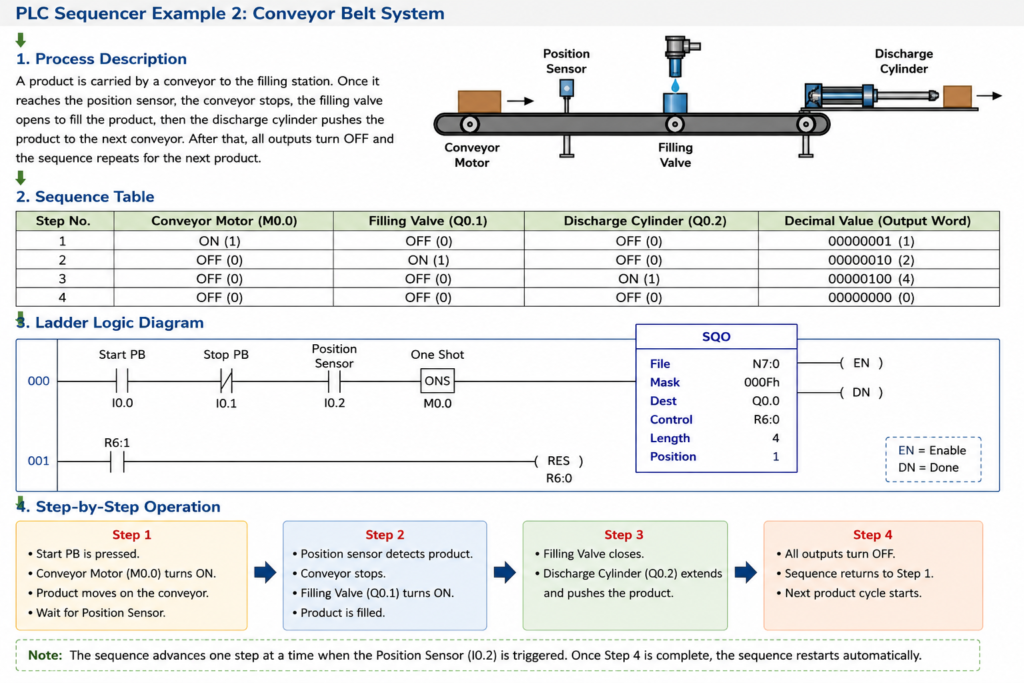
PLC Sequencer Example 2: Conveyor Belt System
A conveyor system often requires several devices to operate in a specific order. A PLC sequencer simplifies this operation by storing each stage as a separate step.
Process Description: A product travels along a conveyor for filling and discharge.
Sequence Table
| Step | Conveyor | Filling Valve | Discharge Cylinder |
|---|---|---|---|
| 1 | ON | OFF | OFF |
| 2 | OFF | ON | OFF |
| 3 | OFF | OFF | ON |
| 4 | OFF | OFF | OFF |
Step-by-Step Operation
The PLC sequencer executes the filling process by activating each output in a predefined order. Every operation is completed before the sequencer advances to the next step.
Step 1: The sequence begins by starting the conveyor motor, which transports the product to the filling station.
Step 2: Once the product reaches the filling position, the conveyor stops. The PLC energizes the filling valve, allowing the required quantity of material to be dispensed into the product.
Step 3: After filling is complete, the PLC de-energizes the filling valve and energizes the discharge cylinder. The cylinder pushes the finished product onto the next conveyor or processing station.
Step 4: The PLC turns OFF all outputs, resets the sequence position, and prepares the sequencer to process the next product. This approach requires only a single sequence table instead of numerous ladder logic rungs, making the program simpler to develop and maintain.
PLC Sequencer Example 3: Bottle Filling Machine
Bottle filling machines perform repetitive operations throughout the production process. A PLC sequencer ensures that every bottle follows the same sequence.
Sequence of Operation
| Step | Operation |
|---|---|
| 1 | Conveyor moves bottle into position |
| 2 | Conveyor stops |
| 3 | Bottle clamp closes |
| 4 | Filling valve opens |
| 5 | Filling valve closes |
| 6 | Clamp opens |
| 7 | Conveyor restarts |
The PLC advances through each step only after receiving confirmation from timers or sensors.
For example:
- The filling valve does not close until the timer finishes.
- The conveyor does not restart until the clamp opens.
- The next bottle cannot enter until the previous cycle is complete.
This ensures accurate filling and prevents product loss.
PLC Sequencer Example 4: Automatic Mixing Tank
In process industries, chemicals are often mixed according to a predefined sequence.
Typical Sequence
| Step | Operation |
|---|---|
| 1 | Open inlet valve |
| 2 | Fill tank |
| 3 | Close inlet valve |
| 4 | Start agitator motor |
| 5 | Mix for preset time |
| 6 | Stop agitator |
| 7 | Open outlet valve |
| 8 | Empty tank |
Each operation is performed only after the previous step has been completed successfully.
PLC Sequencer Example 5: Pneumatic Cylinder Control
Many automated machines use multiple pneumatic cylinders.
Instead of writing separate logic for every cylinder movement, a PLC sequencer executes each cylinder action sequentially.
Sequence
| Step | Action |
|---|---|
| 1 | Cylinder A Extend |
| 2 | Cylinder A Retract |
| 3 | Cylinder B Extend |
| 4 | Cylinder B Retract |
| 5 | Repeat Cycle |
Limit switches confirm each cylinder position before advancing to the next step.
PLC Sequencer Ladder Logic Concept
Although ladder diagrams vary among PLC manufacturers, the basic PLC Sequencer logic follows the same structure.
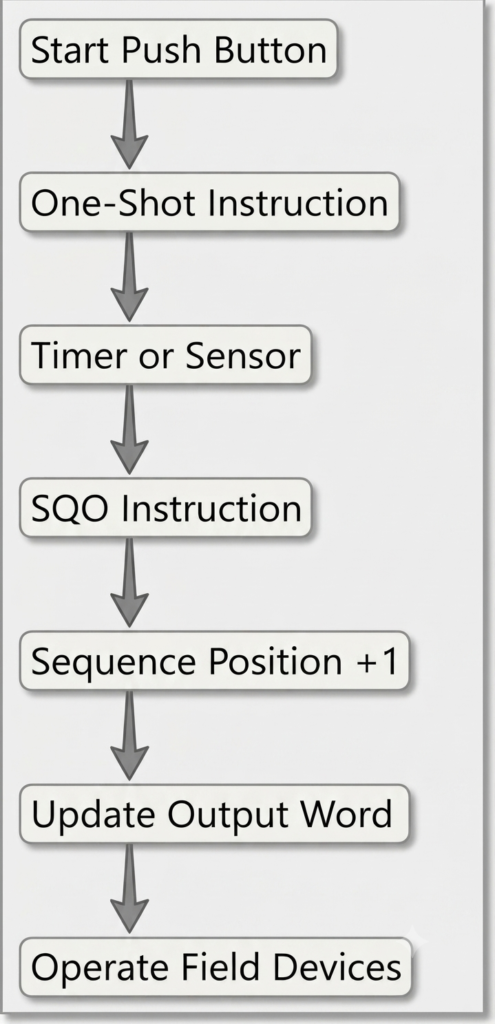
The sequencer advances only once for every valid trigger.
Many programmers use a One-Shot (ONS) instruction to prevent multiple advances during a single PLC scan.
Step-by-Step Execution of PLC Sequencer Logic
The execution of a PLC Sequencer follows a repetitive cycle that ensures machine operations are performed in the correct order.
Step 1: The sequence begins when the operator presses the Start push button, enabling the PLC to initiate the sequencing process.
Step 2: The PLC initializes the sequence position and prepares to execute the first programmed step.
Step 3: The SQO (Sequencer Output) instruction reads the first data word from the sequence table and determines the required output pattern.
Step 4: The PLC transfers this output pattern to the destination output word, causing the connected devices such as motors, valves, or indicators to operate according to the programmed sequence.
Step 5: The PLC waits for an advance signal, which may be generated by a timer, sensor, push button, limit switch, or another triggering device.
Step 6: Once the trigger condition is satisfied, the PLC increments the sequence position and advances to the next step.
Step 7: The next output pattern is read from the sequence table and transferred to the destination output, updating the status of the connected field devices.
Step 8: This process continues until all programmed sequence steps have been executed in the specified order.
Step 9: After the final step is completed, the sequence either returns to the first step and repeats automatically or stops and waits for a new start command, depending on the program design.
PLC Sequencer Logic Flow
The following simplified flowchart illustrates how a sequencer executes a process.
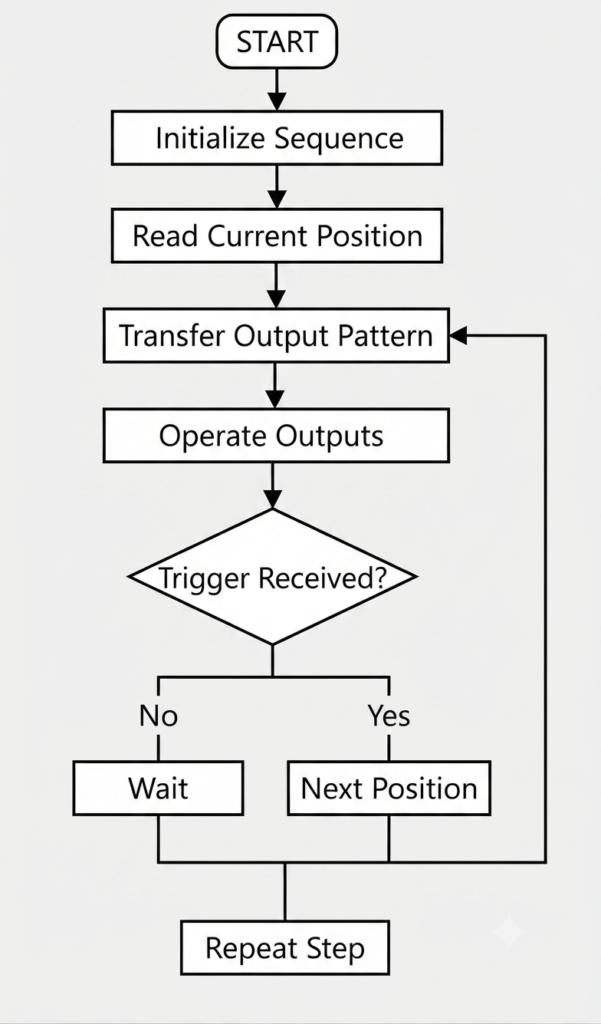
This logical flow is common to almost every PLC sequencer application, regardless of the PLC brand.
Tips for Designing PLC Sequencer Logic
When developing a PLC Sequencer, follow these practices to improve program quality:
- Divide complex processes into smaller sequence steps.
- Use descriptive names for every sequence position.
- Advance the sequence only after confirming the previous operation.
- Keep emergency stop and safety logic separate from the sequencer.
- Reset the sequence properly after faults.
- Use timers only where necessary.
- Test every sequence step individually before commissioning.
- Add comments to improve troubleshooting and future maintenance.
Advantages of Using PLC Sequencer Examples During Learning
Studying practical PLC Sequencer examples helps engineers understand how sequencing works in real industrial environments.
Benefits include:
- Better understanding of sequential machine operation.
- Easier interpretation of ladder logic.
- Improved troubleshooting skills.
- Faster PLC program development.
- Reduced programming mistakes.
- Greater confidence when designing industrial automation systems.
Applications of PLC Sequencer
A PLC Sequencer is widely used in industrial automation because many manufacturing processes require operations to be performed in a predefined order. Instead of programming every output individually, the sequencer controls the complete process step by step.
Some of the most common applications of PLC Sequencer are discussed below.
1. Conveyor Systems
Conveyor systems transport products through different production stages. A PLC sequencer controls the starting, stopping, and movement of conveyors based on sensors and timers.
Typical operations include:
- Starting the conveyor
- Detecting the product
- Stopping at the work station
- Restarting after processing
2. Bottle Filling Plants
Bottle filling systems require multiple operations to occur in the correct order.
For example:
- Position bottle
- Stop conveyor
- Open filling valve
- Close filling valve
- Release bottle
- Start conveyor
Using a PLC sequencer ensures that every bottle follows the same sequence, improving filling accuracy and production efficiency.
3. Packaging Machines
Packaging machines perform repetitive operations such as:
- Product positioning
- Sealing
- Cutting
- Labeling
- Product discharge
A sequencer synchronizes these operations while reducing programming complexity.
4. Traffic Light Control
Traffic lights follow a continuous sequence:
- Green
- Yellow
- Red
A PLC sequencer automatically changes the output states after preset time intervals, making it a simple yet effective application.
5. Material Handling Systems
Material handling equipment such as robotic transfer systems, palletizers, and sorting machines rely on sequential movement.
The PLC sequencer coordinates motors, sensors, and pneumatic actuators to ensure smooth material flow.
6. Batch Processing Plants
Chemical, pharmaceutical, and food industries use sequencers for batch operations such as:
- Filling
- Mixing
- Heating
- Cooling
- Emptying
Every stage starts only after the previous stage has been completed successfully.
7. Automatic Washing Systems
Industrial washing machines execute multiple sequential operations.
For example:
- Water filling
- Washing
- Draining
- Rinsing
- Drying
A PLC sequencer automates the entire cycle.
8. Pneumatic and Hydraulic Systems
Machines using multiple cylinders often require one cylinder to complete its movement before the next cylinder operates.
A PLC sequencer coordinates these operations efficiently while preventing collisions and unsafe conditions.
Advantages of PLC Sequencer
A PLC Sequencer offers several advantages over conventional ladder logic programming.
1. Simplifies Programming
Instead of writing hundreds of ladder logic rungs, a sequencer stores output patterns in a sequence table, resulting in cleaner and more organized programs.
2. Reduces Program Size
Because output combinations are stored in memory, fewer ladder logic instructions are required. This helps reduce program size and improves readability.
3. Easier Maintenance
Adding, removing, or modifying a sequence step usually requires changes only in the sequence table rather than rewriting large portions of the PLC program.
4. Faster Troubleshooting
Since machine operations are divided into clearly defined steps, identifying the current sequence position becomes much easier during maintenance.
5. Improves Machine Reliability
Every cycle follows the same predefined sequence, reducing programming errors and ensuring consistent machine performance.
6. Saves Development Time
Programming repetitive processes becomes much faster because engineers do not need to create separate logic for every output combination.
7. Easy to Expand
Additional sequence steps can usually be added without redesigning the entire control program.
8. Better Documentation
Sequence tables make it easier for operators and maintenance personnel to understand machine operation.
Disadvantages of PLC Sequencer
Although powerful, a PLC sequencer is not suitable for every automation application.
Some limitations include:
- Less suitable for highly complex decision-making processes.
- Conditional branching requires additional programming.
- Large sequences can become difficult to manage if not documented properly.
- Troubleshooting becomes challenging when sequence tables are poorly organized.
- Modern state-machine programming is often more flexible for advanced automation systems.
For complex machines with multiple operating modes, engineers may prefer state-machine programming or Sequential Function Charts (SFC).
PLC Sequencer vs State Machine
Both sequencing methods automate machine operations, but they differ in flexibility and implementation.
| Feature | PLC Sequencer | State Machine |
|---|---|---|
| Programming Method | Sequence table | Individual states |
| Best For | Fixed repetitive operations | Complex machine logic |
| Conditional Branching | Limited | Excellent |
| Program Size | Small | Moderate |
| Easy to Modify | Yes | Moderate |
| Multiple Operating Modes | Limited | Excellent |
| Maintenance | Easy | Moderate |
| Typical Applications | Conveyors, filling, packaging | Robots, CNC machines, automated production lines |
For simple sequential processes, a PLC Sequencer is often the preferred solution. For advanced automation systems with multiple operating paths, a state machine provides greater flexibility.
Best Practices for PLC Sequencer Programming
Following good programming practices improves reliability and simplifies future maintenance.
Some recommended practices include:
- Divide long sequences into logical sections.
- Assign descriptive names to every sequence step.
- Use comments throughout the program.
- Verify sensor feedback before advancing the sequence.
- Keep safety logic independent of the sequencer.
- Include fault recovery and manual reset functions.
- Test the sequence using PLC simulation before commissioning.
- Maintain updated documentation for every sequence table.
Key Takeaways
- A PLC Sequencer executes machine operations in a predefined order.
- Sequencer programming reduces ladder logic complexity.
- SQO controls outputs, SQI verifies inputs, and SQL stores sequence data.
- Sequence tables simplify program modification and maintenance.
- PLC sequencers are ideal for repetitive industrial processes such as conveyors, filling systems, packaging machines, and traffic light control.
- Proper documentation and sensor verification improve the reliability of sequencer-based control systems.
Conclusion
A PLC Sequencer is an efficient programming method for controlling repetitive industrial processes in a predefined order. Instead of creating lengthy ladder logic programs, engineers can store output patterns in a sequence table and execute them step by step using dedicated PLC Sequencer instructions.
Instructions such as SQO (Sequencer Output), SQI (Sequencer Input), and SQL (Sequencer Load) simplify sequential programming by reducing memory usage, improving program readability, and making troubleshooting easier. From conveyor systems and bottle filling machines to packaging equipment and process automation, PLC sequencers provide reliable and consistent machine operation.
Although modern programming techniques such as state machines and Sequential Function Charts offer greater flexibility for highly complex applications, the PLC Sequencer remains an important tool for fixed sequential operations. Understanding its logic, instructions, and practical applications is an essential skill for PLC programmers, automation engineers, and maintenance professionals.
Frequently Asked Questions (FAQs)
A PLC Sequencer is a programming technique that executes a predefined series of machine operations step by step. Each step controls specific outputs or verifies inputs before advancing to the next stage.
A PLC Sequencer instruction is a dedicated PLC instruction used to execute sequential operations. In Allen-Bradley PLCs, common sequencer instructions include SQO, SQI, and SQL.
SQO stands for Sequencer Output. It transfers output patterns stored in a sequence table to the PLC output word according to the current sequence position.
SQI stands for Sequencer Input. It compares actual PLC inputs with predefined input patterns and confirms whether the sequence can safely advance.
SQL stands for Sequencer Load. It stores live data into the sequence table and is mainly used during sequence creation or commissioning.
PLC Sequencer logic is a control method that advances through predefined sequence steps whenever a trigger condition, such as a timer or sensor, becomes true.
PLC sequencers are commonly used in:
Conveyor systems, Packaging machines. Traffic light control, Bottle filling plants, Material handling systems, Chemical processing, Food manufacturing, Pharmaceutical industries
A PLC sequencer controls predefined machine operations step by step, whereas a shift register tracks data movement by shifting bits through memory locations.
Read Next: